Handshake Processor
The “Handshake” processor is installed with the Dataristix Application. Available in the October 2026 release of Dataristix and later, the processor implements a request/acknowledge handshake with a control program, for example, for recipe transfer to a PLC. The control program sets a request, Dataristix processes the request elsewhere in the task and reports back when processing has completed, and the processor then sets an acknowledgement that the control program can wait for.
The processor has two inputs and one output:
- Request
- The request value from the control program. The request is set when the value is not zero or True and reset when the value is zero or False. The value must be Boolean, numeric, or a numeric string; other values (for example, non-numeric text or arrays) are ignored and a warning is logged once.
- Response
- Reports that processing of the request has completed. Any value with ‘good’ status counts as a response, whatever the value. Typically, the response is connected to the outputs of a “Process Write” OPC UA topic or “Process Write” OPC DA topic, which pass on the written values only after they were successfully written to the device.
- Acknowledge
- The acknowledgement for the control program: 1 when the response has arrived for a set request, 0 when the request has been reset.
Handshake Sequence
The following table shows the handshake sequence, for example, when the control program requests recipe number 176.
| Request | Acknowledge | Control program | Dataristix |
|---|---|---|---|
| 0 | 0 | May set the request. | Waits for the request to be set. |
| 176 | 0 | Waits for Acknowledge to be set. | Processes the request elsewhere in the task (for example, looks up recipe 176 in a database and writes the recipe values to the device). The processor sets Acknowledge to 1 when the Response arrives. |
| 176 | 1 | Resets the request. | Waits for the request to be reset. |
| 0 | 1 | Waits for Acknowledge to be reset. | The processor resets Acknowledge to 0. |
Additional rules:
- A Response is only accepted while a request is pending. A response that arrives while the request is reset (for example, a late response after the control program has abandoned the request) is ignored, so Acknowledge is never set while the request is reset.
- If the request is reset before the Response has arrived, then the request is abandoned; Acknowledge remains 0.
- If the first request value received after the task has started is reset, then Acknowledge is set to 0. This clears an acknowledgement that may still be set from before the task was started.
- Request and response values with a status other than ‘good’ are ignored.
- Acknowledge is only sent when it changes, i.e. when set to 1 on a response and when reset to 0 on a request reset.
Note that the processor does not start the processing of a request itself. Connect the request, for example, to the input of a database lookup, or use a Trigger Processor to start processing elsewhere in the task.
Add to Task
Add the “Handshake” processor to a task by dragging it from the “General” processors folder in the “Build” panel onto the task’s “Task Builder” panel.
Configuration
Select the “Handshake” item in the “Task Builder” panel to view its properties.
You can change the following properties:
- Name
- The title of the “Handshake” processor as it appears within the task builder.
Press the “Apply” button to commit your changes.
Example
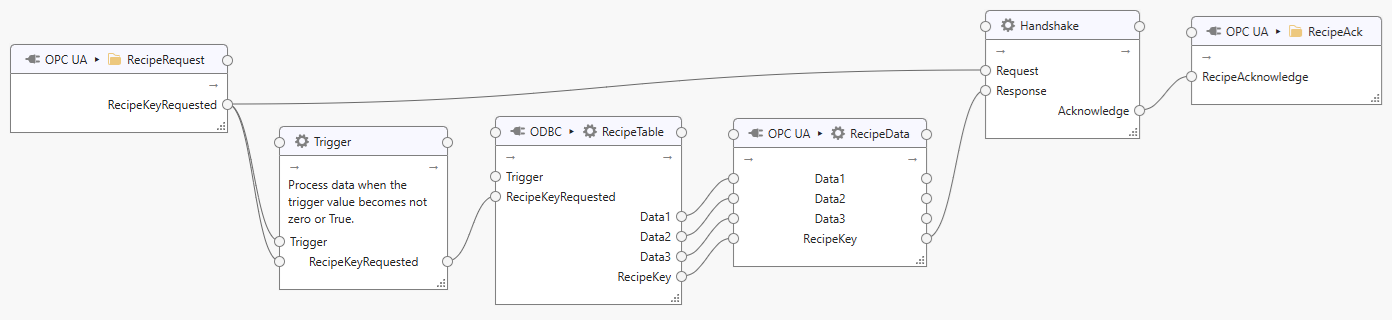
The following outline shows a recipe transfer task with a handshake that confirms to the control program that the recipe was written. It extends the recipe transfer example of the ODBC connector and works the same with the OPC UA and the OPC DA connector:
The control program sets the tag RecipeKeyRequested (in a Read Only topic) to the key of the required recipe, a non-zero value.
RecipeKeyRequested is connected directly to the Request input of the “Handshake” processor. Do not place other processors in between: the “Handshake” processor must also receive the reset of the request.
RecipeKeyRequested is also connected to both inputs (trigger and data) of a Trigger Processor with trigger mode “Process when trigger becomes set” and trigger set condition “… is not equal to zero or ‘true’”. The processor passes a new request on to the input RequestedRecipeKey of the ODBC process topic RecipeLookup. The reset of the request (zero) is not passed on, so no lookup is performed for it. The process query returns the recipe key and the recipe values Data1, Data2 and Data3; the topic’s output tags RecipeKey, Data1, Data2 and Data3 correspond to the selected columns:
select RecipeKey, Data1, Data2, Data3
from RecipeTable
where RecipeKey=@RequestedRecipeKey
The recipe key and the recipe values are sent to a “Process Write” topic (see OPC UA or OPC DA) containing the tags RecipeKey, Data1, Data2 and Data3. The topic writes all four values in a single write request and, after a successful write, passes the written values on. Connect one of the topic’s outputs, for example RecipeKey, to the Response input of the “Handshake” processor.
The Acknowledge output of the “Handshake” processor is written to the tag RecipeAcknowledge in a Write Only topic.
The “Handshake” processor sets Acknowledge to 1 when the response arrives while the request is set. The control program waits for RecipeAcknowledge to become 1 and checks that the returned RecipeKey equals RecipeKeyRequested; since the key is written together with the recipe values, this confirms that the values belong to the requested recipe. The control program then uses the recipe values and resets RecipeKeyRequested to zero, which resets RecipeAcknowledge to 0, completing the handshake.