AI Assistant
Overview
The Dataristix AI Assistant is a suite of AI-powered tools integrated directly into the Dataristix application. It is installed as a module, in the same way as a connector module, and adds a chat panel to the application that you can use to ask questions and get help.
The AI Assistant is designed around three role-based tiers, each aimed at a different kind of user and offering progressively more capability:
- AI Librarian (free) - answers questions from the official Dataristix documentation. Read-only, with no visibility into your project.
- AI Advisor (planned, paid add-on) - additionally understands what you are currently viewing in the application and can tailor its answers to your project. Read-only.
- AI Builder (planned, paid add-on) - additionally has full context of your project and can modify your configuration on request, for example to help create mappings, tasks, and integrations.
Currently, only AI Librarian is available. Contact support@rensen.io for information on early access to Advisor and Builder.
Note
The AI Assistant requires an active Internet connection and a valid commercial license activation. It is not available to users signed in with the Guest role.
Installing the AI Assistant
The AI Assistant is installed like any other connector module. Select the main menu “Add Modules” item, find the AI Assistant module in the list of modules available online, and follow the same installation steps described under Modules.
On Microsoft Windows, the AI Assistant is also offered as an optional component of the Core setup bundle installer, so it can be installed together with Core in one step instead of being added afterward. If you skipped it during the Core installation, you can still add it later via “Add Modules” as described above.
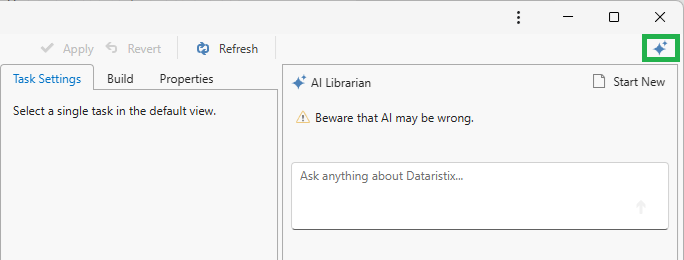
Once installed, a sparkle icon button appears at the top right of the toolbar, next to the user account button. Click it to open or close the AI Assistant panel, which slides in from the right-hand side of the application.
Note
The sparkle icon button only appears once the AI Assistant module is installed and detected. You may need to refresh your browser after installing it, as with any other newly added module.
Using the AI Librarian
Open the AI Assistant panel and type your question into the input box at the bottom, then either press Enter or click the arrow button to send it. The AI Librarian streams its answer back into the conversation above the input box.
Click “Start New” at the top of the panel to clear the current conversation and start a fresh one.
Warning
AI-generated answers can be wrong. Always verify important information, especially before acting on configuration or troubleshooting advice.
The AI Librarian answers from official Dataristix documentation only. It:
- Retrieves definitions, explanations, and troubleshooting guidance based on documented behavior.
- Does not see your project, its configuration, or any data flowing through it.
- Does not know what you are currently viewing in the application.
- Does not make configuration changes or perform any actions on your behalf.
If the panel shows a message that the AI Assistant is currently unavailable, check that your commercial license is active and that the computer running Dataristix has Internet access. If the problem persists, contact support.
Usage Limits
Use of the AI Assistant is metered in credits, consumed per query. The free plan for AI Librarian currently includes around 1,000 credits per month, roughly equivalent to 1,000 queries depending on their complexity, with one concurrent user session. Paid plans that increase available credits and concurrent sessions are expected to become available alongside the AI Advisor and AI Builder roles. Contact support@rensen.io for current pricing and availability.