Main Application
The Dataristix main application is a browser application available at http://localhost:8383 by default. Recommended browsers are all modern desktop browsers. Mobile browsers and touch devices are usable but have limited support at this time; it is not recommended to use touch devices for Task design.
The browser acts as a client for Dataristix background services that are part of the standard Dataristix installation. Connector modules are loaded as plugins into the main application.
The following picture shows parts of the main application window.
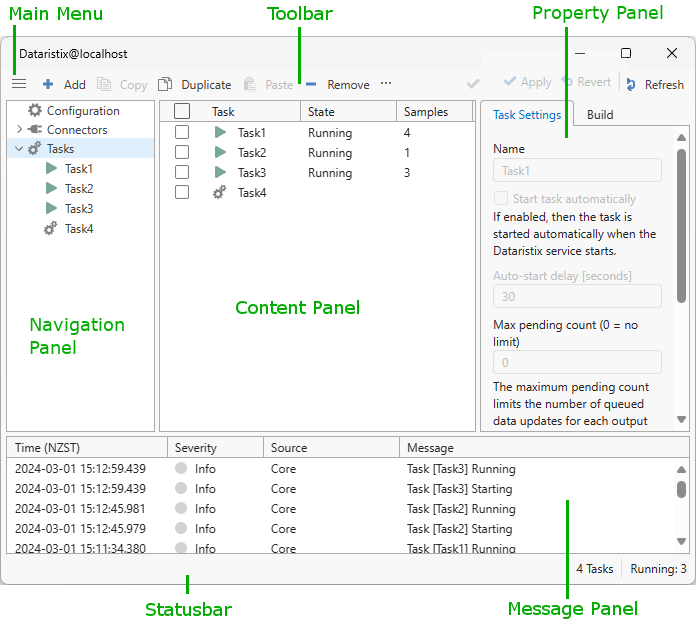
Use the Navigation Panel on the left to switch between different content views.
The content panel displays lists, tabs, or the Task Builder depending on the item selected in the navigation panel.
The toolbar contains the main menu, opened via the menu icon at the top left, with items “New Project”, “Import Project…”, “Export Project…”, “Preferences…”, “Check for Updates…”, “Add modules…”, “Help (online)”, and “About Dataristix…”.
All items except “Preferences…”, “Help (online)”, “About Dataristix…” require the Administrator or Architect role and are otherwise disabled.
The toolbar also contains context-sensitive buttons such as “Add”, “Remove”, “Start”, “Stop”, “Duplicate”, “Refresh”, and “Apply”. When User Access Control is enabled, a “User” button appears at the top right of the toolbar.
The message panel lists recent events such as task start or stop events or any errors that may occur during background operations or as a result of user interactions.
The background service and any running tasks keep running even when you close the browser window.