Time Conversion Processors
Conversions
Time Conversion Processors are installed with the Dataristix Application and include the following processors.
Local Time to UTC
Converts a timestamp value from local time to UTC. Local time is the timezone configured in the server’s operating system.
UTC to Local Time
Converts a timestamp from UTC to local time. Local time is the timezone configured in the server’s operating system.
UTC to POSIX time
Converts a timestamp from UTC to a number of seconds elapsed since 1 January 1970. The conversion disregards leap seconds.
POSIX time to UTC
Converts a number of seconds elapsed since 1 January 1970 to UTC. The conversion disregards leap seconds.
Date and Time Combiner
Takes the date portion of the Date input and the time of day portion of the Time input and combines the two to a new date/time value. The processor has two fixed input tags, “Date” and “Time”, and a single fixed output tag named “Date and Time”.
Date and Time Splitter
Takes a date/time value and splits it into two timestamps: the first contains the date portion with the time set to 00:00:00, and the second contains the time-of-day portion with the date set to January 1, year 1. The processor has a single fixed input tag named “Date and Time”, and two fixed output tags, “Date” and “Time”.
Local Time to ISO String
Converts a timestamp value in local time to an ISO 8601 date and time string.
UTC to ISO String
Converts a timestamp value in UTC to an ISO 8601 date and time string.
Timezone to UTC
Converts a timestamp given the configured timezone into UTC. The timezone is configured in the processor’s properties.
UTC to Timezone
Converts a timestamp given in UTC to the configured timezone. The timezone is configured in the processor’s properties.
Add to Task
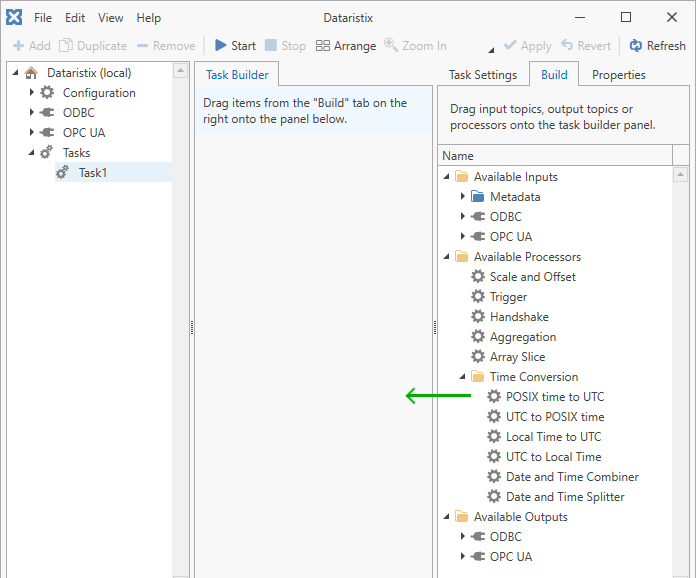
Add a time conversion processor to a task by dragging it from the “Build” panel onto the task’s “Task Builder” panel.
Configuration
Select the processor item in the “Task Builder” panel to view its properties.
You can change the following properties:
- Name
- The title of the time conversion processor as it appears within the task builder.
- For the “Timezone to UTC” and “UTC to Timezone” processors you can also configure:
- The time zone to convert to or from, selected from a dropdown list of the time zones available on the server. This setting defaults to “UTC”, in which case the processor passes the timestamp through unmodified.
Press the “Apply” button to commit your changes.
Example
The following example shows a task that transfers data from OPC UA to an ODBC database. Tag values that need to be converted are connected to the processor. The incoming date/time value will be converted to local time before storing the data into the database.
