Topics
REST Connector topics are collections of tags. Each tag defines a URL to communicate with the REST service. Topic settings apply to all tags within the topic.
Add Topics
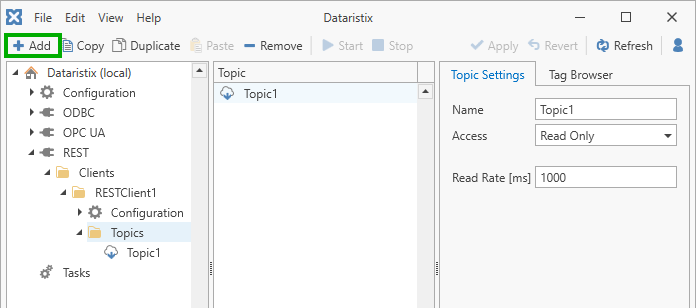
To add topics, select the REST connector’s Topics node in the navigation panel of the main application, then click the Add button.
Topic Settings
For each topic you can configure:
- Name
The topic’s name.
- Access
One of Read Only, Read and Write, Write Only, or Process. By default, topics are Read Only and all requests sent to the REST service use the GET method.
Topics with Read access may be used as inputs in tasks. Tags that you add to the topic appear as output tags of the task node.
Topics with Write access may be used as outputs. Tags that you add to the topic appear as input tags of the task node. Writable topics offer the additional option to select the “Write” method for sending data to the REST service (see below).
Process topics may have inputs and outputs for integration into task processing logic. Tags that you add to the topic appear as output tags of the task node, and additional input tags may be defined using placeholders (see below). Each process topic task node also has a Trigger input that may be used to initiate requests when there are no input value changes. This makes Process topics the most flexible option. After setting the topic access to “Process”, select a suitable request method and enter additional input tag placeholders in the entry field provided.
- Read Rate
The read rate setting is available for Read Only and Read and Write topics. This value (in milliseconds) determines how often GET requests are sent to the REST service to fetch data. Ensure that the REST service is performant enough to respond to periodic requests at the configured rate.
- Write Method
Available for topics with Write access. Supported Write methods are: PATCH, PUT and POST. Select the appropriate method for the intended use.
- Process Method
Available for topics with Process access. Supported Process methods are: GET, PATCH, PUT and POST. Select the appropriate method for the intended use.
Additional Settings for Process Access
- Do not retry failed requests
If checked, then failed requests are not retried. Task logic should be used to handle retries.
- Additional request parameter placeholders
Enter placeholder names as additional input tags. Append a question mark to a placeholder name to indicate that it is optional and may be omitted in requests.
For GET requests, placeholders represent query parameters appended to the request URL. Each placeholder name appears as an input tag in task nodes. For example, if placeholders a, b, and c are defined, and the task provides values a=1, b=2, and c=3, then the resulting GET request might be:
http://localhost/path?a=1&b=2&c=3(with URL-encoded parameters).For PATCH, PUT, and POST requests, input values for the specified parameters are sent in the request body and the format depends on the Input values are JSON objects setting (see below).
- Input values are JSON objects
Available when the Process Method is PUT, PATCH, or POST.
When enabled, input values are treated as JSON objects and sent with the
application/jsoncontent type. A single input is sent as one JSON object; multiple inputs are sent as an array of objects.When disabled, inputs are url-encoded as key-value pairs with the
application/x-www-form-urlencodedcontent type.
Press the Apply button to commit any changes.
Remove Topics
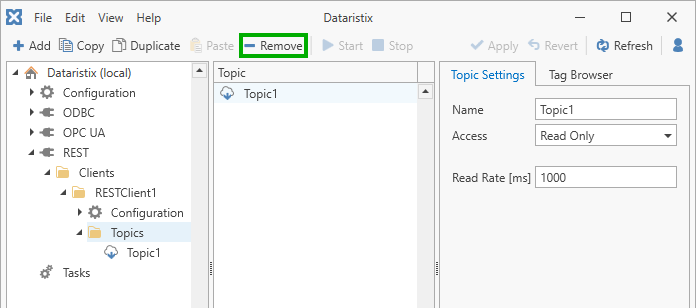
Remove topics by selecting Topics in the navigation panel, then select one or more topics to remove in the content panel, and finally click on the Remove toolbar button to remove selected topics.
Warning
Note that topics are also removed from any task using the topics.